


A software demo looks perfect until a critical feature requires another paid plan. Two months later, someone is still copying data into a spreadsheet.
Does that mean you should build your own software? Not necessarily.
The short answer: In the custom software vs off-the-shelf decision, buy a ready-made tool when it handles an ordinary business process well. Build custom software when an important workflow cannot work properly inside existing products and the long-term value justifies owning the system. Choose a hybrid approach when an existing tool works well but needs a focused integration or custom feature.
First, answer these five yes-or-no questions
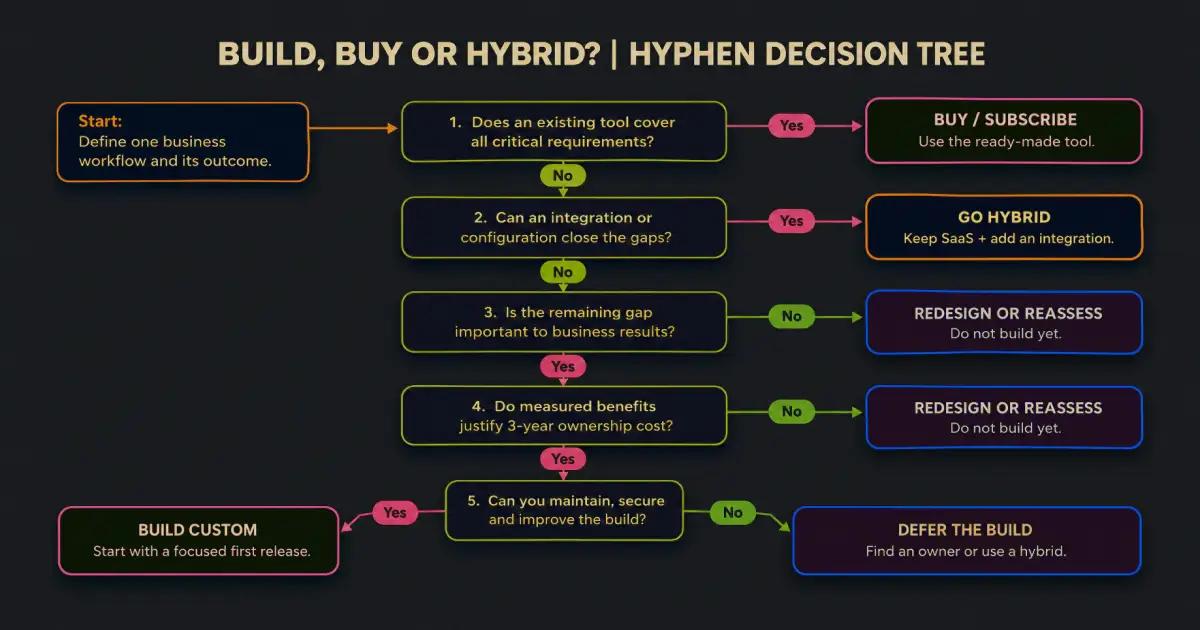
Before requesting a development quote or buying another subscription, work through Hyphen's Five-Question Build-or-Buy Test.
- Does an existing tool meet your critical requirements? Focus on tasks that must work every day, not features that look impressive in a demo.
- Can configuration or an integration close the gaps? Would a connector, automation, or small custom feature solve the problem without replacing the tool?
- Is the remaining gap important to business results? Does fixing it improve service, reduce waste, or give you a meaningful advantage?
- Will measurable benefits justify three years of ownership cost? Compare money and staff time saved against development, hosting, and upkeep.
- Can someone own the software after launch? Who handles security, fixes, backups, support, and future changes?
How to read your answers: If the process is standard and SaaS meets the essentials, buy. If the tool is close but disconnected, integrate. If the workflow is strategically important, no tool or integration fits, and the economics and maintenance plan make sense, build. If nobody can maintain it, wait.
Figure 1: Hyphen's decision tree for choosing SaaS, custom software, or a hybrid system.
What is custom software, and what is off-the-shelf software?
Off-the-shelf software is a product designed for many customers. You subscribe, configure your account, and start using features the provider already maintains. Customer relationship management (CRM), accounting, booking, payroll, and project-management tools often work this way.
Custom software is built for a defined business need. It might be a patient portal, a distributor's approval system, or a dashboard that combines branch records.
SaaS, short for software as a service, is the subscription-based delivery model used by many ready-made tools. So in a typical SaaS vs custom comparison, you are choosing between renting access to an existing product and paying to create a system that your business controls under its contract.
Neither approach guarantees better security, lower cost, or a smoother experience. Those depend on the product, the people running it, and how it is built.
| Decision factor | Off-the-shelf / SaaS | Custom software |
|---|---|---|
| Getting started | Usually faster | Requires planning and development |
| Upfront spending | Usually lower | Usually higher |
| Ongoing spending | Licences, add-ons, staff effort | Hosting, maintenance, support |
| Workflow flexibility | Limited by product settings | Designed around agreed requirements |
| Updates | Vendor decides most product changes | Your business prioritizes changes |
| Ownership and exit | Depends on vendor terms and data exports | Depends on contract, code, hosting, and documentation |
Microsoft's Azure Well-Architected guidance on building versus buying recommends evaluating control, launch time, technical skills, full cost, and continuing support rather than comparing purchase prices alone.
Build vs buy software: what problem are you actually paying to solve?
A subscription price is easy to see. The cost of a messy process is not.
Imagine a growing distribution business with 25 employees using a ready-made order-management tool. Staff can create orders and invoices, but the product cannot handle the company's unusual approval steps. Managers approve orders in a messaging app. Finance checks discounts in a spreadsheet. Someone then updates the original tool by hand.
The software technically works. The business process does not.
A smaller company with standard approvals may have no reason to replace that same tool.
The better question is "What does our current workflow cost us, and what would changing it improve?"
Begin with one outcome: fewer missed appointments, faster approvals, fewer errors, or less duplicate entry. Without a target, every feature sounds essential.
The real comparison: three-year total cost of ownership
Total cost of ownership (TCO) means everything you spend to set up, use, support, and change a system over a chosen period. Three years captures recurring expenses without requiring distant forecasts.
For a subscription, calculate:
SaaS TCO = setup + 36 × (licences + add-ons + workaround time + administration) + other expected costs.
For a custom build, calculate:
Custom TCO = discovery and build + migration and launch + 36 × (hosting + maintenance + internal administration) + other expected costs.
Add expected training, extra integrations, payment or API usage fees, security reviews, price increases, and eventual exit or migration costs when they apply. Avoid counting an employee's time twice. Microsoft also recommends accounting for operational skills, training, and architecture choices in software cost estimates.
A worked example: 25-person operations team
Suppose an established business has two realistic options. These are illustrative planning assumptions in USD, not Hyphen project quotes, vendor prices, or industry averages. We assume both options support the same essential work, all employee time is valued at $30 per hour, and prices stay unchanged for 36 months.
| Cost over 36 months | Off-the-shelf SaaS | Custom software |
|---|---|---|
| Initial setup, training, or build | $2,000 | $26,000 |
| User licences: 25 × $24/month | $21,600 | $0 |
| SaaS add-on | $6,300 | $0 |
| Manual workarounds: 10 hours/month | $10,800 | $0 |
| Admin time | $5,400 (5 hrs/month) | $3,240 (3 hrs/month) |
| Hosting and backups | Included in assumption | 4,320(120/month) |
| Maintenance and security work | Included in assumption | 10,800(300/month) |
| Three-year total | $46,100 | $44360 |
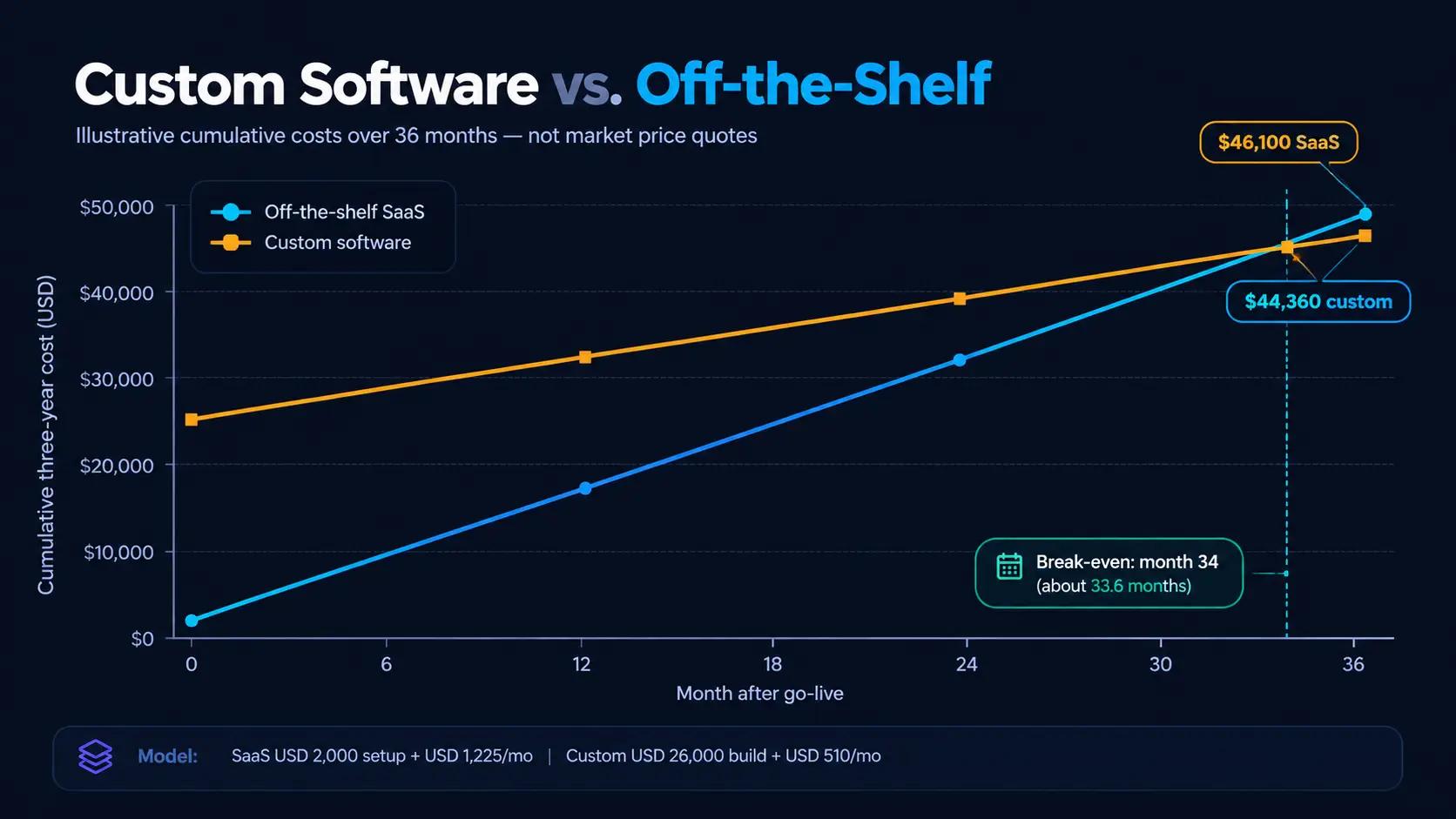
Figure 2: Cumulative cost of SaaS versus custom software from month 0 to month 36. The lines cross around month 34 in this example.
At first, SaaS looks much cheaper: $2,000 to begin versus $26,000 to build. But the SaaS option costs $1,225 each month once licences, add-ons, workaround time, and administration are included. The custom option costs $510 a month in ongoing expenses under these assumptions.
The custom system catches up after about 33.6 months and finishes year three $1,740 cheaper. That is a narrow win, not a reason to start coding tomorrow. A $5,000 increase in build scope would make custom more expensive over this period. A higher subscription tier would push the other way.
Also estimate material downtime, taxes, feature changes, migration risks, and the value of launching sooner.
The lesson: Compare the cost of completing the same work, not just the software bill. A cheap tool that consumes 15 hours a month may not be cheap. A custom system with no maintenance budget may be far more expensive than it appears.
Seven signs you may have outgrown your current tool
A tool can be excellent and still stop being right for your business. These warning signs deserve investigation:
1. Your spreadsheet has become the real system. Employees export records, repair them in Excel, then upload them again. That is a sign that essential work happens outside the product.
2. People enter the same information twice. Sales updates one platform while operations updates another. Every duplicate step creates room for mistakes and delays.
3. A simple change needs three workarounds. New approval rules, branch permissions, or pricing structures force staff into manual steps the software was never designed to handle.
4. Your subscription bill grows faster than the value. More employees need access, but many only need one small feature. Per-seat charges or premium add-ons start to dominate the cost.
5. Customers notice the limitations. Appointment booking, order tracking, account access, or response times suffer because staff cannot connect information quickly.
6. The reports cannot answer basic questions. Managers wait days to combine files before they can see branch performance, stock levels, or service delays.
7. You cannot change what matters. A critical feature depends on the vendor's roadmap, and there is no practical alternative through configuration, an API, or an integration.
One sign does not justify a rebuild. Look for repeated, measurable problems.
The overlooked third option: SaaS plus custom integrations
The choice is not always SaaS vs custom. Frequently, the sensible answer is to keep the reliable product and build only what is missing.
Think of it like renovating a working shop. If you need another entrance, you do not demolish the entire building.
A clinic might keep its established appointment or patient-management system but add a branded booking page and automated reminders. A wholesaler might keep its accounting software and create an approval dashboard that shares data through supported APIs. An agency might connect its CRM, lead forms, and reporting tools instead of developing an entire CRM from scratch.
The hybrid route works best when the existing platform has reliable APIs or webhooks, clear data permissions, affordable integration access, and predictable limits. It fails when vendors restrict essential data or integration access.
Could hybrid be cheaper in our example?
Possibly. Suppose the business keeps its $600 monthly licences and $175 add-on, spends $4,000 once on a focused integration, and pays $80 monthly to maintain it. The integration cuts workarounds to one hour and administration to three hours each month.
Its new monthly cost becomes $975: $600 + $175 + $30 + $90 + $80. Including $2,000 of original setup and $4,000 for integration, the three-year total is $41,100.
In this particular model, hybrid costs $5,000 less than unchanged SaaS and $3,260 less than full custom. Test whether the integration actually removes the work before committing.
Hybrid systems still need security reviews, monitoring, documentation, and a clear answer to a simple question: Who fixes things when the connection breaks?
When to build custom software, and when not to
Build when an important workflow is genuinely different, commercial tools cannot support it safely or efficiently, and a focused custom product creates measurable value that outweighs development and ongoing ownership costs.
For example, a logistics company with unusual dispatch rules may benefit from a system that matches how its drivers, warehouses, and customers actually work. A healthcare provider with complicated patient journeys may need a carefully scoped portal connecting approved systems, with appropriate privacy and security controls. Neither example means every logistics company or clinic needs custom software.
Build only after defining a useful first release, testing it with users, and assigning a long-term owner.
Before approving a build, ask for a basic prototype or workflow map, a list of included features, an estimated delivery window, ownership terms for code and data, security responsibilities, a support plan, and an exit process if you change vendors. You should understand what happens after launch as clearly as what happens before it.
When Hyphen tells a client not to build
Hyphen works with businesses on software, websites, integrations, and automation. That does not mean every business problem needs a custom application.
Our principle is simple: do not commission a system merely because you can. Build when there is a business reason.
We would recommend not building when a proven subscription already handles the critical workflow, the problem is mostly weak staff training, or the company has not tested whether customers even want the planned feature. We would also be cautious when the budget covers development but nothing for support, the requirements change every week, or the expected savings exist only in a sales presentation.
Sometimes the right recommendation is to configure the existing tool. Sometimes it is to automate two repetitive steps. Sometimes it is to replace an unnecessary subscription. And sometimes it is to keep the current setup until the business has better evidence.
That protects investment for work that genuinely needs to be different.
If the problem calls for a build, Hyphen's role is to help define the smallest useful version, connect the necessary systems, and plan the experience, delivery, and upkeep around the business objective rather than a long feature list.
A practical 30-minute decision exercise
You do not need an IT department to start. Sit with the people doing the work and write down five things:
- The task: What exactly must happen, and how often?
- The current cost: How much do licences, add-ons, errors, and staff hours cost each month?
- The gap: Which requirement is truly missing, rather than simply inconvenient?
- Three options: What would buying, integrating, and building each cost over 36 months?
- The owner: Who will be responsible for results and future support?
Ask vendors to explain assumptions and quote the same scope. If the problem is unclear, start with discovery.
Test what happens if staff numbers double, SaaS rates rise, or delivery is delayed.
Frequently asked questions
Is custom software always more expensive than SaaS?
No. Custom software usually needs more money upfront, but SaaS can cost more over time when licences, add-ons, and manual work grow. The result depends on scope, user count, upkeep, and the chosen time period.
2. When should a small business buy software instead of building it?
Buy when the task is standard and an existing tool meets your must-have needs at an acceptable total cost. A small business rarely benefits from rebuilding payroll, email, or basic accounting just to avoid a subscription.
3. When to build custom software instead of using SaaS?
Build when your critical process is different enough that available products force costly workarounds, reasonable integrations will not fix the gaps, and you can fund the software's entire life—not only its launch.
4. What is the biggest hidden cost of off-the-shelf software?
Often it is staff time spent working around limitations. Measure repeat data entry, exports, approvals, reporting, and corrections before deciding the subscription is cheaper. For some businesses, other charges or transition costs will be bigger.
5. Can I combine off-the-shelf software with custom development?
Yes. A hybrid approach connects an existing product to a focused custom portal, automation, report, or workflow. Check API access, pricing, security, vendor terms, and maintenance responsibilities first.
6. How long should a build vs buy software comparison cover?
Three years is a useful starting point for an owner deciding today. Extend the comparison to five years when you expect a long system life, expensive migrations, or significant growth. Recheck assumptions as your business changes.
7. The decision that actually matters
Off-the-shelf software is not automatically a compromise. Custom software is not automatically an upgrade. Both are tools, and the right tool is the one that removes the right problem at a cost your business can carry.
Start with the workflow. Measure the hidden labour. Compare three-year ownership costs. Explore integrations before replacing a working system. Only then decide whether to build.
Have one process that your current software cannot handle? Tell Hyphen which tool you use, what keeps going wrong, and what that problem costs you each month. We will start with the problem, not a pitch for a rebuild.